The Tech Artist
One man's blunderings into the 3D realm
Project maintained by Derfies Hosted on GitHub Pages — Theme by mattgraham
Interior Builder
09 Sep 2011 -
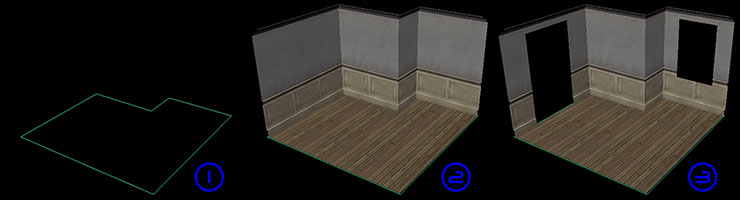
The Interior Builder was a tool I developed while working on the video game LA Noire to help artists build high quality interior locations as quickly as possible. While the creation of a few walls, a ceiling and a floor doesn’t sound like a big deal, the job starts to get more complicated when certain features of older style houses like skirting boards, wainscoting, picture rails and cornices are going to be replicated. Initially these rooms were built by hand with prefab sections of wall imported and moved into place, then scaled and UVed. Other menial tasks had to be performed so the assets worked in-game, like tagging each wall for the appropriate collision type. In order to help artists produce these rooms as quickly as possible I created a tool which would build these rooms automatically from a single degree nurbs curve in Maya.
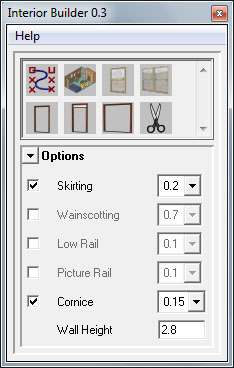
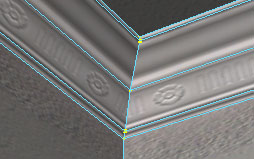
Once an artist creates a curve they can then select the height of the wall feature they require and build the room. Each wall is created with the selected features and tagged with a box collision tag so the player doesn’t walk through it in-game. Note also how the vertices of each feature of the wall are pulled back away from the wall’s normal eliminating any overlapping polygons or z-fighting when the wall feature’s geometry is parallel to the floor.
Once a room has been built the artist can make further adjustments by using cutter planes to cut holes out of the walls to accommodate windows and doors. After selecting a wall and pressing a window or door icon, a cutter plane will appear in the scene. After being positioned appropriately a click of the scissors will punch a hole through the wall, and artists can then place window and door frames as they see fit.